A free Desk Setup Kit example
Do you need a separate dock?
Count the connections you actually need before buying another box.
Illustrative worked example; no hardware test or customer testimonial is implied.
No email or account required.
Start with the requirement
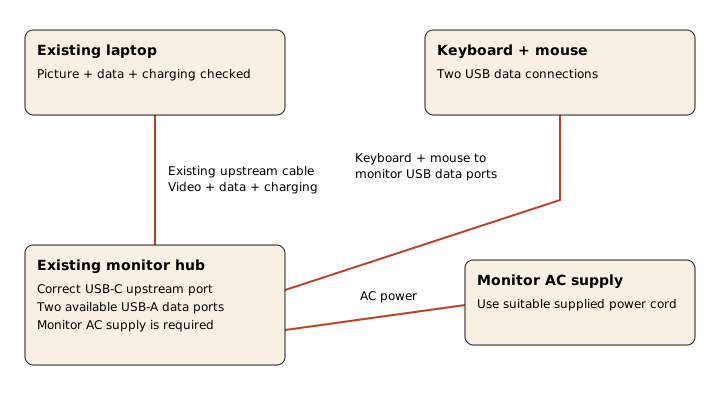
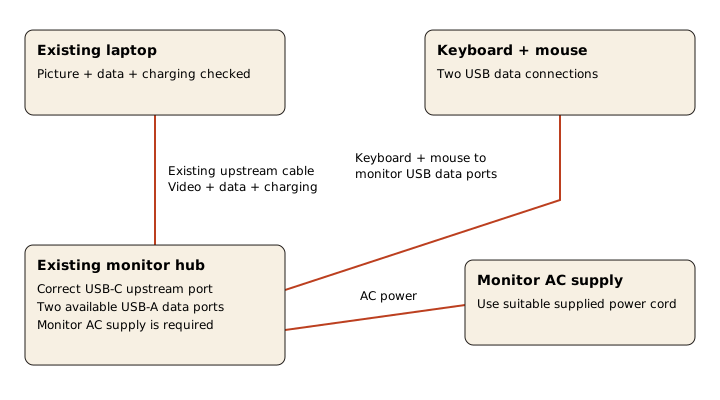
You already have a laptop, a monitor with a USB-C upstream connection and two available USB-A data ports, a USB keyboard and a USB mouse. In this example, your current laptop-to-monitor cable already passes picture, data and charging checks. You use Wi-Fi and one display; you do not need a fast external drive or a second screen.
The decision: keep the monitor, skip the dock
Keep the monitor and skip a separate dock for this setup. The keyboard and mouse use the two monitor data ports. The existing upstream cable handles the laptop connection, and the monitor still has its own AC power. There is no missing connection for a separate dock to solve.
A short keep / replace inventory
- Laptop + monitor + upstream cable - Keep
- The current setup already passes picture, USB data and charging checks.
- USB keyboard + USB mouse - Keep
- Two devices use the two available monitor data ports.
- Separate dock - Skip for now
- No unmet display, network or peripheral requirement in this example.
Draw the connection, including power
Before treating your setup as equivalent
- Check the exact laptop and monitor models, installed OS and port labels; record them in your online inventory.
- Confirm the monitor has a usable upstream connection and the two ports are data ports, not charging-only ports.
- Use the correct upstream port and a suitable video/data cable; matching connector shapes are not enough.
- Connect monitor AC and verify the intended picture, both input devices and laptop charging independently.
- Run a sleep/wake and disconnect/reconnect check before tidying the cables.
When the answer changes
If a webcam needs a third USB data connection, your count changes. First check whether a free laptop port works for it. If that is inconvenient, compare a small hub with a separate dock against the new requirement. If you add a display or fast drive, revisit host protocol, bandwidth, OS, power and display limits. Do not assume every USB-C dock can satisfy that new setup.
Budget for the actual change
New equipment spend in this keep-existing example is $0. That is a valid planning result, not a price quote for the equipment. If a replacement cable or adapter is needed, enter its exact current quote before treating the budget as complete. The $19 full kit is optional and is purchased separately.
Buy the missing capability, then verify it. A neat-looking desk does not require a second box when the monitor already covers the work.
The full kit's contents
- Start with what already works
- Keep, replace or investigate
- Budget for the change, not the whole photograph
- The older monitor and its successor
- Compatibility before checkout
- One documented connection example
- Upgrade in the order of your bottleneck
- Assemble and verify
- Version, sources and honest limits
The full Stack adds researched equipment decisions, three desk contexts, finished visual references and online gear, budget, requirements, connection, upgrade and progress tools. $19 once for the digital product. Equipment is separate.
See the kit and actual previews